I made a thing. It’s called shotta.app.
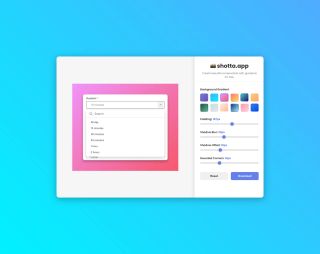
You take a screenshot, drag it into your browser, and it gives you a nice gradient background. It's useful for blogs, documentation, or social posts.
What it does and doesn’t do
It adds padding, rounded corners, and a gradient behind your screenshot. You can pick from preset gradients or make your own.
It doesn’t require an account. It doesn’t add watermarks. It doesn't cost money. It doesn’t upload your image to a server. Everything happens locally in your browser using client-side JavaScript. It’s just a simple page.
Why I built it
Most screenshot tools are either overly complex or require editing in another app. I wanted something that did one job: frame a screenshot cleanly, without any steps. So I built it.
How to use it
- Go to shotta.app.
- Drag your screenshot onto the page.
- Tweak the gradient, padding, or corners if you want.
- Download the image.
That’s it. It’s free. If you find it useful, great. If not, that’s fine too.