Confluence gives your team a place to write, document and share knowledge. What it doesn't tell you is whether anyone is actually reading it – which pages are useful, which are ignored, what people search for and can't find, or which spaces are driving the most engagement.
That's the gap Google Analytics in Confluence fills. It brings Google Analytics 4 reporting directly into Confluence, so you get content intelligence without leaving your wiki.
Why Confluence analytics matter
Most Confluence administrators manage their spaces on gut feel. They create pages, run training sessions, and hope the content sticks. Without data, it's impossible to know:
- Which pages are genuinely useful vs. which are read once and abandoned
- What users search for and can't find – a direct signal of missing content
- Which spaces drive the most engagement across your organisation
- Whether a specific user group is actually adopting a new section of the wiki
Google Analytics solves all of this. The challenge has always been getting that data back into Confluence in a usable form, rather than requiring a separate login and a context switch to the GA4 interface.
What Google Analytics in Confluence does
The app embeds GA4 reporting natively inside Confluence – in space homepages, page footers, and dedicated analytics views. No external tabs, no sharing Looker Studio links, no granting GA access to everyone who needs a report.
Space analytics
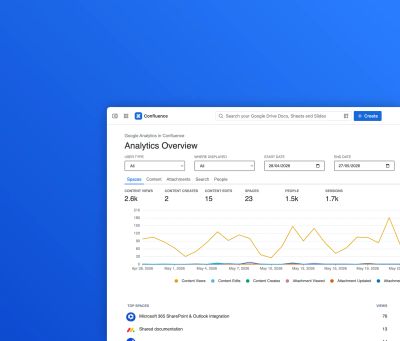
At the space level, you get high-level metrics: total page views, unique visitors, sessions, and engagement rates. You can identify your most-read pages, spot content that's falling behind, and track trends over time.
→ How to improve Atlassian Confluence user adoption with analytics
Site search analytics
Site search is one of the most underused signals in content strategy. When users search for something and don't find it, that's a content gap. When the same term appears repeatedly with no results, that's a priority for your next content sprint.
The app surfaces your top search terms, shows which queries return no results, and helps you understand what content your users are actively looking for.
→ Improve content findability in Confluence with site search analytics
Page analytics
Individual pages get their own analytics view – views over time, bounce rate, average engagement time, and the sources driving traffic to that page. Useful for measuring the impact of a specific knowledge base article or a major documentation update.
→ Enhanced reporting and permissions for Google Analytics in Confluence
People analytics
Beyond pages, the app tracks user-level behaviour – which individuals or groups are most active, where specific users are spending time, and how engagement varies across teams.
→ Google Analytics in Confluence – new people analytics features
Tracking Confluence content wherever it's displayed
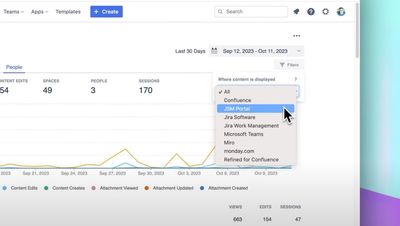
Confluence content doesn't always stay in Confluence. Pages get embedded in Jira, surfaced in Microsoft Teams, and displayed in monday.com. The app tracks views across all of these contexts, giving you a complete picture of where your content is actually being consumed.
→ Tracking embedded Confluence content wherever it is displayed
Building custom reports in GA4
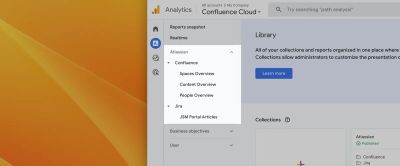
The in-Confluence reporting covers most use cases, but for more advanced analysis – custom funnels, cross-space comparisons, JSM portal analytics – you can build reports directly in Google Analytics 4 and embed them back into Confluence pages using Looker Studio.
→ Building custom reports for Confluence & JSM Portal in Google Analytics 4
→ How to embed Google Analytics reports in Atlassian Confluence
Google Analytics in Jira and Jira Service Management
The same analytics capability extends to Jira and Jira Service Management. Track which JSM portal articles are being read, measure self-service deflection rates, and understand how users are navigating your service desk – all from within Jira.
→ Google Analytics in Jira & Jira Service Management – product overview
→ Improved reporting and permissions for Google Analytics in Jira & JSM
→ Building custom reports for the JSM Portal in Google Analytics 4
The Jira integration is available separately on the Atlassian Marketplace.
What teams use it for
Enhance your workflows with David Simpson Apps
Discover powerful apps and integrations for monday.com, Atlassian, and Microsoft 365. Streamline processes, embed analytics, and boost collaboration.
Explore appsContent teams use space and page analytics to prioritise their editorial calendar – writing more of what's working and retiring what isn't.
IT and knowledge base teams use site search analytics and JSM portal tracking to measure self-service effectiveness and reduce ticket volume.
Confluence administrators use people analytics to track adoption across departments and report on ROI to leadership.
Intranet teams use cross-platform tracking to understand how Confluence content performs when embedded in Teams, Jira or other tools.
Cloud, Server and Data Center
Google Analytics in Confluence is available across all Atlassian hosting options – Cloud, Server and Data Center. If you're migrating between hosting types, the documentation covers the migration path.
Full documentation is at dsapps.dev.
Get started
The app is available on the Atlassian Marketplace with a free trial.