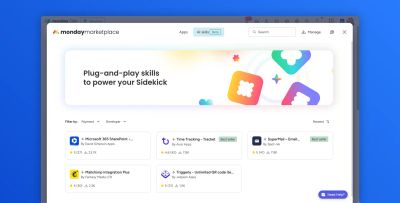
We're thrilled to be one of just five launch partners for Sidekick AI skills on the monday.com marketplace, alongside Avisi Apps, Fantasy Media, Jetpack Apps, and spot-nik.
How we got here
The launch grew out of a hackathon involving a dozen or more companies — some joining remotely, most in person at monday.com HQ. Of those, five came out the other side as launch partners.
Only two of the five, Avisi and David Simpson Apps, weren't in the room — everyone else built their skill on-site with help from monday.com engineers. Getting a remote entry across the line alongside four teams working shoulder-to-shoulder with the monday.com product team is the part we're proudest of.
We had exactly one week to get the development work done before heading off on annual holiday — so this one was built under a real deadline, not just a hackathon one.
What Sidekick AI skills can do
monday Sidekick is monday.com's built-in AI assistant — a natural-language chat interface that sits inside your boards and items, letting you ask it to read data, update columns, and take action without building an automation first. Skills extend what Sidekick can do by giving it access to a specific integration or data source.
Our Sidekick AI skills bring much of what our Microsoft 365 automation blocks & workflows already do into monday Sidekick itself — so instead of building an automation, you just ask for it in plain English, from inside the item you're working on.
Here's what that looks like in practice:
The skills we launched with
Extract data from Excel spreadsheets
Ask Sidekick to read an Excel file from an item's SharePoint folder, preview and filter the rows, and import exactly what you need onto the board — no manual copy-pasting between spreadsheet and item.
→ Extract data from Excel spreadsheets — full docs
Extract data from Word documents
Point Sidekick at the Word documents in an item's SharePoint folder and it reads the contents and populates the relevant board columns directly from what it finds.
→ Extract data from Word documents — full docs
Extract data from Outlook email conversations
Sidekick finds the email addresses stored on an item, searches Outlook for conversations with them, and adds each email as an item update in date order — complete with sender, subject, timestamp, a link back to Outlook, and sentiment analysis on the content.
→ Extract data from Outlook email conversations — full docs
List SharePoint sites
A simple one: ask Sidekick to list the SharePoint sites available to you via your Microsoft 365 credentials, right from a natural-language prompt.
→ List SharePoint sites — full docs
Thank you
None of this happens without the monday.com team who ran the hackathon and shepherded it through to a marketplace launch. Particular thanks to Dipro Bhowmik and Dana Levy for the support throughout — from the initial idea to getting a remote-built skill over the line alongside the on-site teams.
Try it yourself
All four skills ship as part of the Microsoft 365 SharePoint & Outlook integration — the same app that handles your SharePoint automation, document generation, and Outlook workflows.