We're delighted that you've chosen to get started with Microsoft Power BI Embedded for monday.com. This page will give you an overview of this app's functionality.
Prerequisites
- A subscription to a supported Microsoft Power BI plan, such as Power BI Pro.
Installation
Simply install the app from the monday.com marketplace and then you are ready to go.
Usage
In Microsoft Power BI
Select the report.
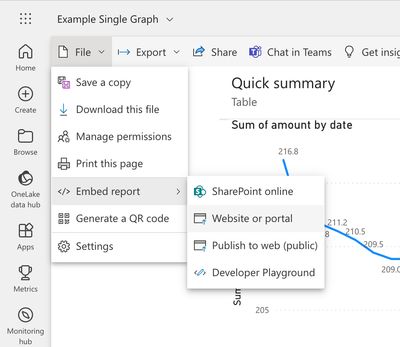
In the File menu, select Embed report, then Website or portal.
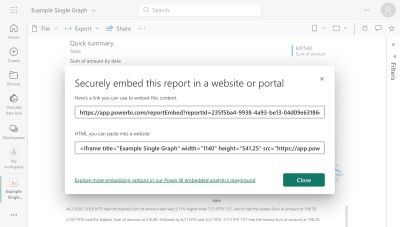
Copy the URL from the "Securely embed this report in a website or portal" popup.
In monday.com
For Board Views and Dashboard Widgets
- Add the Microsoft Power BI Embedded app in monday.com.
- Paste the URL in the Embed URL field in widget settings.
For Item Views
- Open the Item View sidebar and select Add View.
- Add the Microsoft Power BI Embedded app.
- In Settings, select a column for the URL.
- Paste the embed URL into that column for your board item.