Our LaTeX macros support LaTeX as well as mhchem.
There are 2 LaTeX macros available:
LaTeX (Block) for block level equations
LaTeX (Inline) for inline equations
How to Use
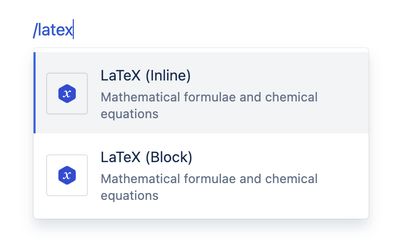
- In the Confluence editor, type /latex and select LaTeX (Block) or LaTeX (Inline).
- Add your LaTeX formula or chemical equation in mhchem format into the macro body screen.
- Save the Confluence page.
Your mathematical formula or chemical equation will be displayed.
Example syntax
Mathematics – LaTeX syntax
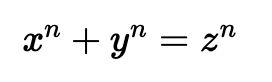
Example 1 - Pythagorean theorem Macro body
x^2 + y^2 = z^2
Output:
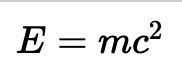
E=mc^2
Output:
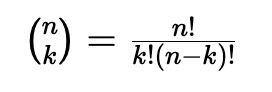
\binom{n}{k} = \frac{n!}{k!(n-k)!}
Output:
| Description | Syntax | Output |
|---|---|---|
| Greek letters | \alpha \beta \gamma \rho \sigma \delta \epsilon | 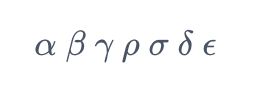 |
| Binary operators | \times \otimes \oplus \cup \cap | 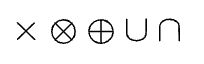 |
| Relation operators | \subset \supset \subseteq \supseteq | 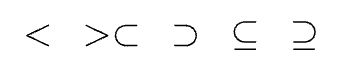 |
| Others | \int \oint \sum \prod | 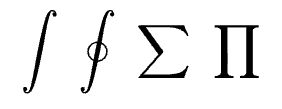 |
Chemistry – mhchem syntax
Chemical equations
Example 1. Macro body:
\ce{CO2 + C -> 2 CO}
Output:

\ce{Hg^2+ ->[I-] HgI2 ->[I-] [Hg^{II}I4]^2-}
Output:

Chemical formulae
Example 1. Macro body:
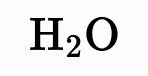
\ce{H2O}
Output:
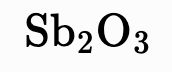
\ce{Sb2O3}
Output:
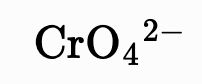
\ce{CrO4^2-}
Output:
[AgCl2]-
Output:
![mhchem rendered charged species: [AgCl₂]⁻](/products/chemistry-toolkit-for-confluence/docs/latex-macros/KsQwwhifnc-200.jpeg)
Nuclides, isotopes
Example 1. Macro body:
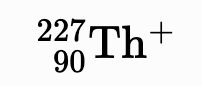
\ce{^{227}_{90}Th+}
or
\ce{^227_90Th+}
Output:
\ce{^{0}_{-1}n^{-}}
or
\ce{^0_-1n-}
Output:
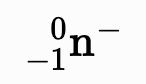
Example 3. Macro body:
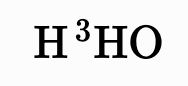
\ce{H{}^3HO}
or
\ce{H^3HO}
Output:
Reaction arrows
Example 1. Macro body:
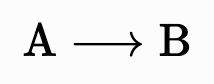
\ce{A -> B}
Output:
Example 2. Macro body:
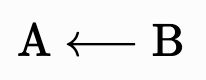
\ce{A <- B}
Output:
Example 3. Macro body:
\ce{A <-> B}
Output:
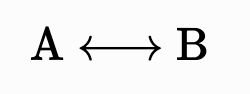
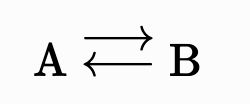
Example 4. Macro body:
\ce{A <--> B}
Output:
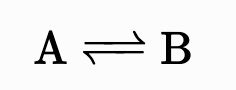
Example 5. Macro body:
\ce{A <=> B}
Output:
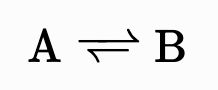
Example 6. Macro body:
\ce{A <=>> B}
Output:
Example 7. Macro body:
\ce{A <<=> B}
Output:
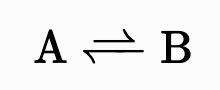
Example 8. Macro body:
\ce{A ->[H2O] B}
Output:
![mhchem rendered labelled reaction arrow: A →[H₂O] B](/products/chemistry-toolkit-for-confluence/docs/latex-macros/oXpmtEr_4y-244.jpeg)
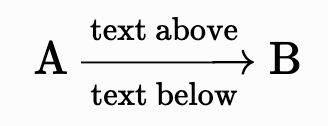
\ce{A ->[{text above}][{text below}] B}
Output:
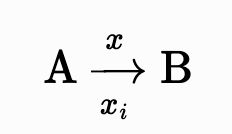
\ce{A ->[$x$][$x_i$] B}
Output:
Parentheses, brackets, braces
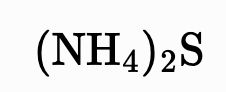
Use parentheses ( ) and brackets [ ] normally. Write braces as \{ \}. Example 1. Macro body:
\ce{(NH4)2S}
Output:
\ce{[\{(X2)3\}2]^3+}
Output:
![mhchem rendered chemical formula with nested brackets and braces: [{(X₂)₃}₂]³⁺](/products/chemistry-toolkit-for-confluence/docs/latex-macros/AXKyJ5wEPu-286.jpeg)
For large parentheses, \left and \right macros need to be in the same math environment, so you might have to put \ce into $ into \ce, but that’s fine. Example 3. Macro body:
\ce{CH4 + 2 $\left( \ce{O2 + 79/21 N2} \right)$}
Output:
