Features
The Table from CSV (with Rendering) macro is an advanced formatting macro for Confluence.
It has the following features:
- Takes either of the following as input the name of a CSV file which is attached to the current page
- the URL of a remote CSV file
Display a CSV with a header row as a table, where the first row is always a header row
- Support for tab separated values (TSV) format
- Auto detection of the separator – comma
,, tab\t, pipe|, etc
Support for remote files (hosted elsewhere)
Filter/search field for quick access to data
Sort the table by clicking on the header cells
Wrap cell content, or not
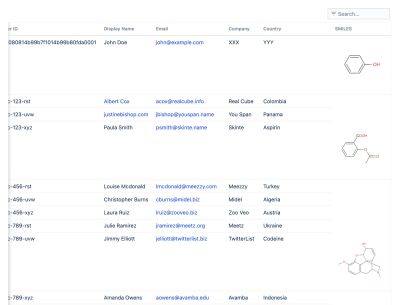
Renders the following
- LaTeX notation to mathematical & chemical equations - where the table header is named
LaTeX(with this exact capitalisation) - SMILES format to 2D chemical structures - where the table header is named
SMILES - InChI format to 2D chemical structures - where the table header is named
InChI(with this exact capitalisation) - URLs and email addresses are hyperlinked
- Links in markup language are hyperlinked e.g.
[David Simpson Apps website](https://www.dsapps.dev/)are rendered in HTML
Horizontal scrollbars for large content with shaded indicators to suggest you can scroll horizontally
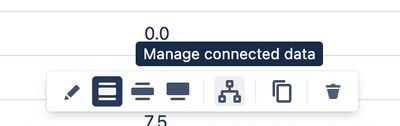
Tables can be connected to Charts using the Manage connected data context menu item:
How to use
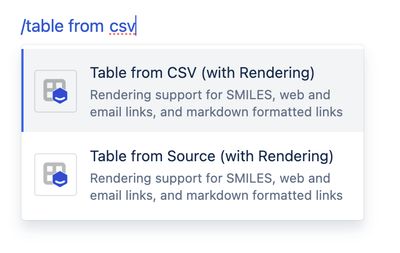
In the Confluence editor, type /table from csv and select Table from CSV (with Rendering).
The macro properties panel will appear.
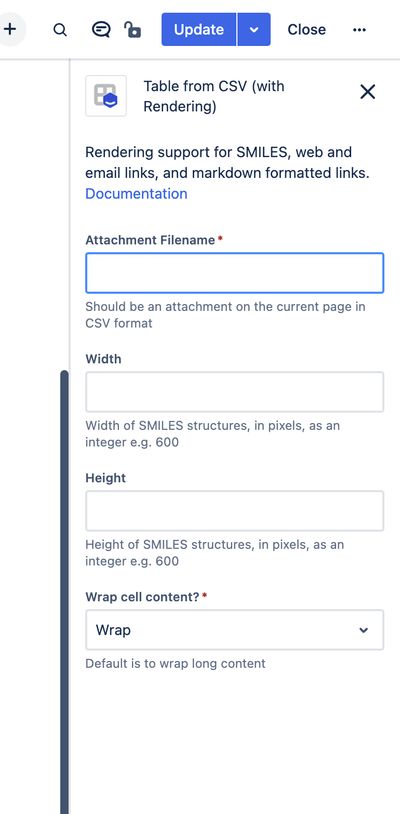
In the Attachment Filename, either add the name of an attached CSV file, or the URL or a remote CSV file. The attachment must be for an attachment on the same page.
You can use the following example URL to see how the macro works:
https://gist.githubusercontent.com/dvdsmpsn/cfa79f7ef8c7924281af4650af5ac1ea/raw/5f3613837e8435225bd162d5a7a76d4ac668eabf/example-for-table-from-csv-with-rendering.csv
Add the width and height for any rendered SMILES structures, or leave for the default size.
Choose whether or not to wrap the cell content.
Save the Confluence page and the table will be rendered.
Simple example

Larger dataset with “no-wrap” on cells
The table scrolls sideways, with shading on left or right to show that there is more content out ovf view
Note that these examples are just sample data and not real people.