App views can appear blank, or changed due to browser extensions or network-level policies blocking the app's content.
Browser content blockers
Extensions such as AdBlock Plus, Ghostery, DuckDuckGo Essentials, and Privacy Badger can prevent apps from loading. To diagnose:
- Disable your content blocker and refresh the page.
- If the app loads correctly, add the app's domain to your blocker's allow list.
Network-Level blocking
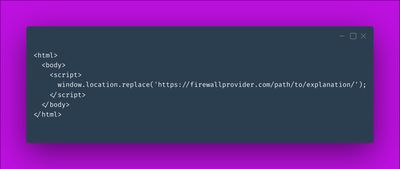
Some organisations block untrusted domains at the network level. To diagnose, open the browser console and inspect the iframe element — a blocked request will show a firewall redirect:
Domains to allow
Add these domains to your browser extension or network allow list:
https://www.gaic.app/(Google Analytics in Confluence)https://www.gaij.app/(Google Analytics in Jira)https://embedin.app(BI Dashboards in Confluence, and related apps)https://chemistry-toolkit-for-confluence.dsapps.info(Chemistry Toolkit for Confluence & Table from CSV apps)https://atlassian.dsapps.info/(other marketplace apps)