All subscriptions renew automatically each month (or each year for annual subscriptions) unless cancelled.
Cancellation Steps
- Open the app's Billing tab.
- Click the three-dot menu (•••) next to the Use App button in the top right corner.
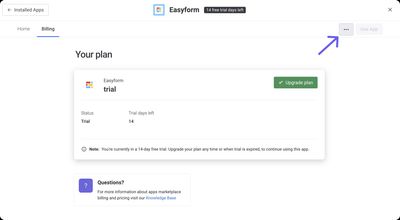
- Select Cancel subscription.
Your subscription ends at the conclusion of your current billing period — not immediately.
Alternative
If you uninstall the app without reinstalling it before the renewal date, the subscription will automatically cancel at renewal.