You can block access to the app using the administration settings with the Microsoft Azure Portal. This will prevent users from being able to login with the app to Microsoft 365.
Installing the app & blocking access
Step 1: Grant admin consent
Before you attempt to block access to the app for all but a select group of users, you'll have to grant admin consent for the app at adminconsent.m365.app.
This does 2 things:
- It installs the app in the Azure Portal, so you can subsequently block access
- It allows permission fo users to access the app
Step 2: Limiting access in the Azure Portal
Having granted admin consent, the "monday.com imtegrations" app should now be visible in your Azure Portal.
Login at portal.azure.com & browse to Enterprise applications
- Go to the Enterprise Application (not the App Registration) → Properties → set "Assignment required?" to Yes.
- Then under Users and groups, assign only the specific users or groups you want to have access.
- Admin consent for the permissions still technically applies tenant-wide, but only assigned users can actually sign in and get a token for the app. Everyone else gets blocked at sign-in.
Here's a video demo of the above steps:
What blocked users will see
Users who have not bee assigned access to the app will still have access to the Microsoft 365 login screen, but instead of seeing the consent questions, they will see a similar error message to this:
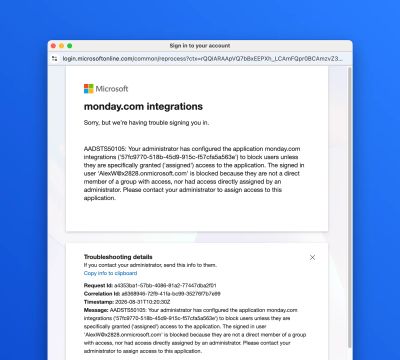
The text content of the message:
Sorry, but we're having trouble signing you in.
AADSTS50105: Your administrator has configured the application monday.com integrations ('57fc9770-518b-45d9-915c-f57cfa5a563e') to block users unless they are specifically granted ('assigned') access to the application. The signed in user 'user@x2828.onmicrosoft.com' is blocked because they are not a direct member of a group with access, nor had access directly assigned by an administrator. Please contact your administrator to assign access to this application.