This automation builds and exports Word documents based on your monday.com data and saves them in SharePoint. It's 'mail merge' for monday.com boards and items.
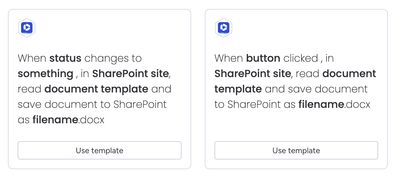
The templated document generation automations allow users to generate Word documents from templates, pull data from your monday.com boards and save the generated documents within SharePoint.
These automations allow you to generate all your professional documents, invoices, quotes, legal agreements or any other type of file from your own templates.
How the automation works
Here’s a walkthrough video to show how the automation works:
Key features
- Generate Word documents on status change or button click
- Use your own custom templates with your own branding, stored on SharePoint Online
- Populates data from items and subitems
- Store the generated documents within your company SharePoint folder displayed in the item view
Prerequisites
The configured folder for the item must have been created by either:
Prepare your Word templates containing tags which match your monday.com board structure:
- Preparing your Word templates — for how to add placeholders
- Document template gallery — for examples of prebuilt Word templates
Store your document templates using a unique and easy-to-remember name in a SharePoint site.
Example templates
Browse the Document template gallery to view examples of how to create your own document templates.
Get a free support session to help you with your templating needs.
Included automations/triggers
- Create document on button press
- Create document on status change
Benefits over alternative document generators
- Store all generated documents in SharePoint Online, allowing you to:
- View the document history for any changes and dates of changes
- Keep all your project documents together in a single repository
- Different buttons or status changes can create documents from different templates