The great thing about Secure Embed is that access to the file or folder is only granted if the permissions have already been assigned to you in Microsoft 365.
This ensures the security of proprietary information. It is therefore advisable to review the permissions of a file or folder within Microsoft 365 before sharing it in monday.com (although it's acceptable if you choose not to).
One approach is to align group memberships in Microsoft 365 with those in monday.com.
OneDrive for Business
Normally within your personal files in OneDrive for Business, the files are not shared unless you have already shared them yourself.
We consider it an anti-pattern to be sharing folders or files from OneDrive for Business with people in monday.com because you have to consider how you've already shared these files within Microsoft 365.
OneDrive is intended for personal use, so it's preferable to explore using SharePoint sites, which are designed for sharing.
SharePoint Online
SharePoint sites are built for sharing. If you have similar group memberships within your SharePoint site as you do within your monday.com boards, administration will be kept to a minimum.
Requesting permission when the folder or file has not been shared with you
If you find that a you do not have access to a file or folder, you’ll see the following screen:
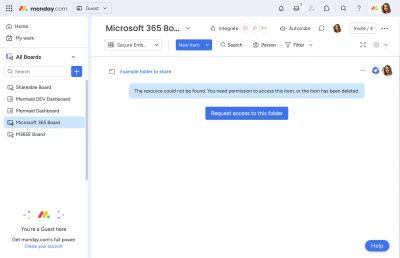
Getting access to a file or folder is simple and is detailed in this page: