Problem
On enterprise plans of a monday.com subscription, your administrator can restrict access to the account based on IP address.
This blocks access for any device accessing the account from an IP address that has not been specified.
In reality this means that users cannot access the account unless they are physically located in the correct place, or have a VPN which permits this. The same restrictions also apply to any apps that connect to your account.
If this affects your account, automation blocks will return the following error message:
This monday.com account restricts API access to specific IP addresses, and this app's server is not on that allowlist. Ask your monday.com admin to add it, then try again. Further details: https://allowlist.m365.app/
Solution
To solve this problem, the IP address of the service hosting the app also needs to be added to the allowlist.
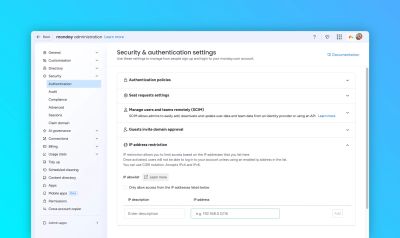
The standard way to allow access, is to add the IP address to the allowlist in monday.com administration:
This app is hosted in the following regions:
| Name | IP Address | Region | monday.com Region | |
|---|---|---|---|---|
| 🇦🇺 | australia-southeast1 | 35.213.247.80 | australia-southeast1 | au |
| 🇦🇺 | australia-southeast2 | 34.1.189.134 | australia-southeast2 | au |
| 🇪🇺 | europe-west1 | 35.210.247.138 | europe-west1 | eu |
| 🇪🇺 | europe-west3 | 35.207.155.235 | europe-west3 | eu |
| 🇮🇱 | me-west1 | 34.0.65.191 | me-west1 | il |
| 🇺🇸 | us-east1 | 35.211.88.68 | us-east1 | us |
| 🇺🇸 | us-east4-1 | 35.212.43.200 | us-east4 | us |
| 🇺🇸 | us-east4-2 | 35.212.78.240 | us-east4 | us |
| 🇺🇸 | us-east4-3 | 35.212.47.254 | us-east4 | us |
To allow this app to communicate with your monday.com account, add each of the above IP addresses for your account's monday.com region to the allowlist in the monday.com administration section.