This automation block can be used as a drop-in replacement for the recipe sentences in the Simple folder generation automation.
We also recommend using the Secure Embed item view to interact with the files in the SharePoint folder after the SharePoint folder has been created for the item.
This automation block allows you to create complex folder structures and also link to existing folders in SharePoint.
For automations
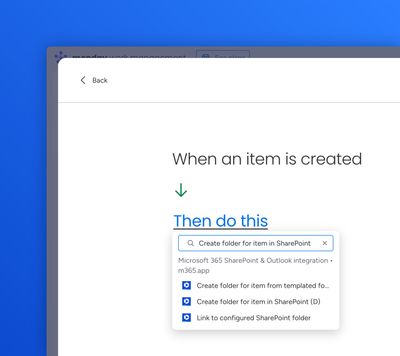
Use the "Create from scratch" automation builder to select a relevant trigger such as "When item created", then paste "Create folder for item in SharePoint" into the "Then" section:
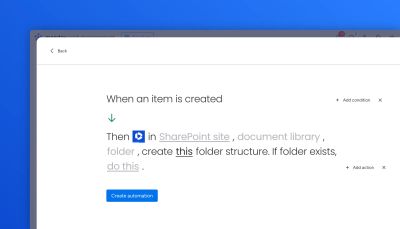
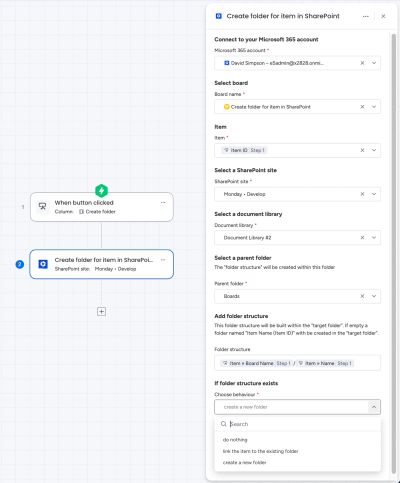
Select the SharePoint site, document library, and folder:
Select the folder structure to build: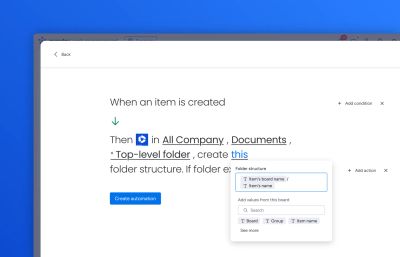
Tips:
- Use
/as a folder separator for nested folders. - If no folder structure is added, a folder will be created with the item's name and ID, like so
Example item name (12345678)
Decide what to do if the folder already exists: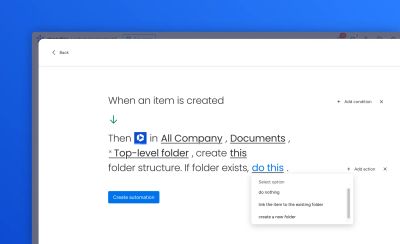
There are 3 choices here:
- do nothing – the automation will stop before creating a folder
- link the item to the existing folder – as described
- create a new folder – a new folder will be created for each item – an incremental number will be added to the end of the folder name for all duplicated folder names
How the automation block works
Here's a walkthrough video to show how the automation block works:
For workflows
Here is an example workflow using the action:
How the workflow works
Here's a walkthrough video to show how the workflow feature works:
Alternative walkthrough video
Here's another walkthrough video which shows how to create a folder based off a column value, rather than the item name.
This video shows both the workflow and also the corresponding automation: