When an item has a SharePoint folder created for it using one of the following automations or workflows:
We normally suggest also using the Secure Embed item view to interact with the files in the SharePoint folder.
It is however also possible to add a link to the configured folder in a column of type Link for the item.
To use this automation block, we recommend adding it to the end of a workflow — for example after the Create folder for item in SharePoint automation block.
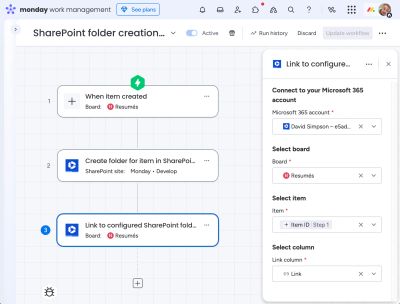
How the workflow works
Here's a walkthrough video to show how the workflow feature works.
Start at 01:54 for the "Link to configured SharePoint folder" part:
When to run or re-run this automation block
A drawback of linking directly to a SharePoint folder using a Link column is that SharePoint generates the link URL based on the folder's current location and name within the SharePoint site & document library. If the folder is later moved or renamed, the existing link breaks.
If you use either of the following automation blocks within a board...
- Move configured SharePoint folder
- Rename folder for item in SharePoint
- Update SharePoint folder configuration
...we also recommend that you rerun this automation block directly afterwards to maintain link integrity.