This automation block allows you to import a single email message from Outlook into the Emails & Activities feature within monday CRM based on the Message ID.
The standard use case for this automation block is the third part of the following sentence:
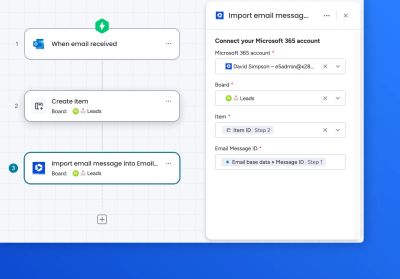
When an email is received in Outlook, create an item, and add the email to Emails & Activities in monday CRM
How it works
For workflows
This is normally a 3 step process
- Add the trigger – When email received in Outlook – provided by monday.com - emits Message ID
- Add the action – Create item – provided by monday.com
- Add the action – Import email message into Emails & Activities • Outlook – this automation block
In step 3 above, fill out the various fields. Use the Message ID from step 1 in the Email Message ID field:
Here’s a walkthrough video to show how the workflow feature works:
Key benefits
- Exact dates and times of the original email is retained in each activity
- Emails from private mailboxes can be shared team-wide
- Imported email persist in the CRM even after team members depart