When something happens, rename the configured SharePoint folder to a name populated from board items, for example {Project Code} - {Item Name} - {Owner}.
This automation allows you to rename the configured SharePoint folder for an item which has previously been created using an automation such as
Generally these are named in the format Item Name (Item ID), which can sometimes be limiting.
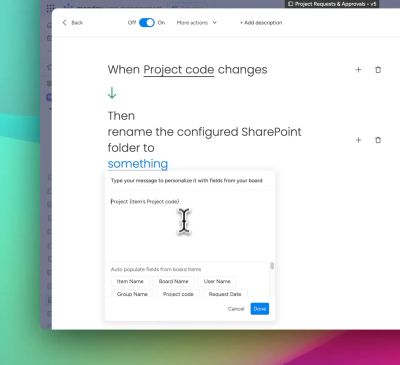
This automation allows you to rename the folder created based on some templated values from the item's columns. If the new name already exists, it will rename the folder with a numeral afterwards, e.g.
New folder name 1New folder name 2.
Example use case: If your board contains a column named 'Project code' which holds a unique code for the item's project, when the column is changed, the folder can be named after the Project code, by selecting 'Project code' in 'Auto populate fields from board items'.
Automation recipes
No automation recipes are supplied for this automation. You simply create your own custom automation recipe by clicking on the + Add automation button in Automation center.

This allows you maximum flexibility to rename the folder as required.
How the automation works
Here’s a walkthrough video to show how the automation works: