Secure Embed allows you to securely embed a file or folder from Microsoft 365, OneDrive for Business and SharePoint Online within monday.com.
Operations available:
- View/preview most file types
- Edit files in native Microsoft 365 apps (Word, PowerPoint, Excel) with automatic saving to Microsoft 365
- Open files in browser or download
- View Microsoft 365 files as PDF
Available in:
- Board views
- Item views
- Dashboard widgets
- Workdoc widgets
- Object views (views created in main left navigation)
How it works
Here’s a walkthrough video to show the Secure Embed board view feature:
Using the Secure Embed in item views, dashboards and workdocs is very similar and more videos for those will be published soon.
When to use
- When the file must remain completely private
- When you wish to share a folder and its content
- When there are strict access controls on the file or folder
When not to use
- When you simply want to share a link with anyone
- When the file can be displayed publicly
Advanced usage
In item views
This feature can import files stored in monday.com columns of type file into the configured Microsoft 365 folder.
If the item has columns of type file, and within those columns, there are files stored within monday.com assets (but not as OneDrive, Box or Google Drive files), the Import assets from file columns to this folder button will be displayed at the bottom of the item view.
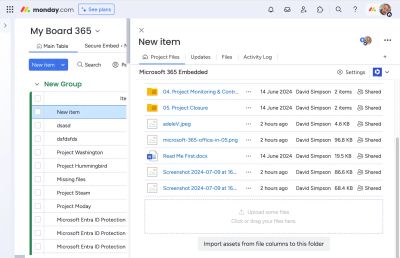
Press the button to import all your monday.com assets into the Microsoft 365 folder. Once the import has completed, you may delete the files from monday.com as required.
Configuration
Link behaviour
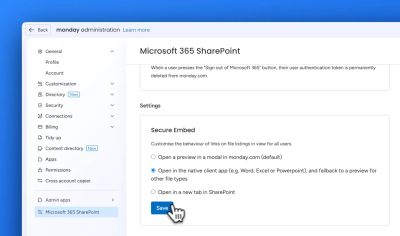
By default, the links in the Secure Embed folder view open in a preview modal window within monday.com, but this is configurable by browsing to Administration:
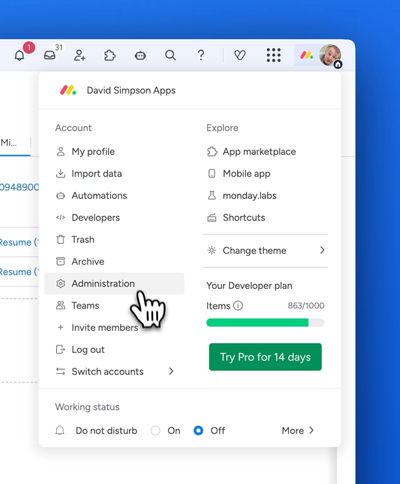
Then Admin Apps & Microsoft 365 SharePoint:
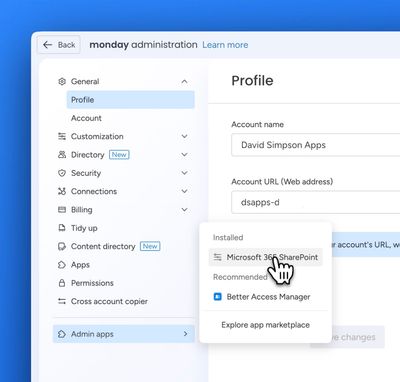
From here you can customise the link behaviour:
Video demo:
FAQs
Can I edit Office files such as documents & spreadsheets in monday.com?
Microsoft do not permit you to edit Office files directly on monday.com, but there are a variety of alternatives. In the file list view, click on the "•••" / action menu next to the file name, and you can select:
- Open in browser – edit the file in a browser directly in SharePoint
- Open in app – edit the file in your desktop Microsoft 365/Office app such as Word, Excel, PowerPoint