This automation block parses data output from the Send HTTP Request automation block.
Just like the Send HTTP Request block, it is only available for workflows, not automations.
How the workflow works
The JSON parser uses a JSONata expression to transform JSON from one shape to another.
Here’s a walkthrough video to show how the workflow feature works:
What is JSONata?
JSONata is a JSON query and transformation language. It is an extremely powerful way to transform JSON data from one shape to another.
See: jsonata.org
Worked examples
Creating a status rollup for subitems
Send HTTP Request block
In the Send HTTP Request block, we used the following:
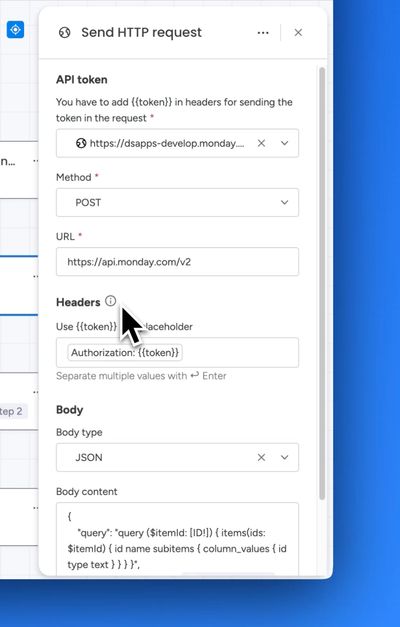
The body content is:
{
  "query": "query ($itemId: [ID!]) { items(ids: $itemId) { id name subitems { column_values { id type text } } } }",
  "variables": { "itemId": [ *[Step 1|Item ID]* ] }
}
where *[Step 1|Item ID]* is the value of the Item ID from step 1 of the workflow.
JSON Parser block
Sidekick AI understands JSONata, so you can use it to create the expressions you need.
We asked Sidekick the following:
With the following GraphQL query:
{
  "query": "query ($itemId: [ID!]) { items(ids: $itemId) { id name subitems { column_values { id type text } } } }",
  "variables": {
    "itemId": [ ${itemId} }
 }
I want a JSONata expression which parses the result, gets all the subitem status column values, then outputs a string as follows:
- If the total count equals the count of "Done" values → all are done → "Done"
- If any are "Stuck" → "Stuck"
- If any are "Working on it" → "Working on it"
- Otherwise → ""
Sidekick produced the following expression for a status rollup for subitems:
(
  $statuses := data.items[0].subitems.column_values[id="status"].text;
  $total := $count($statuses);
  $doneCount := $count($statuses[$ = "Done"]);
  $total = $doneCount ? "Done"
    : $count($statuses[$ = "Stuck"]) > 0 ? "Stuck"
    : $count($statuses[$ = "Working on it"]) > 0 ? "Working on it"
    : ""
)
Here’s the full demo video for creating a status rollup for subitems:
Creating a timeline rollup for subitems
Send HTTP Request block
In the Send HTTP Request block, we used the following:
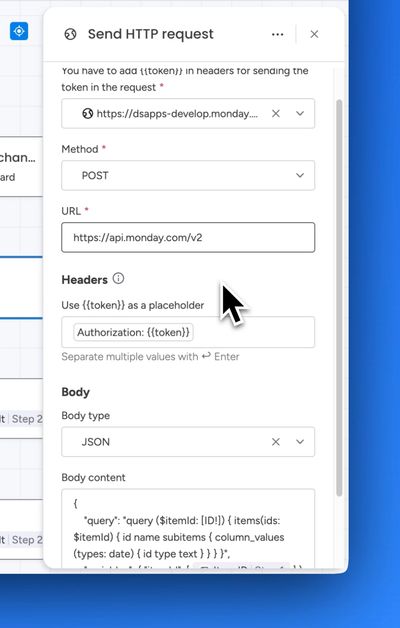
The body content is:
{
  "query": "query ($itemId: [ID!]) { items(ids: $itemId) { id name subitems { column_values (types: date) { id type text } } } }",
  "variables": { "itemId": [ *[Step 1|Item ID]* ] }
}
where *[Step 1|Item ID]* is the value of the Item ID from step 1 of the workflow.
JSON Parser block (Step 3)
Get the min date from the subitem columns:
(
  $dates := data.items.subitems.column_values[type = "date" and $string(text) != ""].text;
  $min := $sort($dates)[0];
  $max := $sort($dates)[-1];
  $min
)
JSON Parser block (Step 4)
Get the max date from the subitem columns:
(
  $dates := data.items.subitems.column_values[type = "date" and $string(text) != ""].text;
  $min := $sort($dates)[0];
  $max := $sort($dates)[-1];
  $max
)
Here’s the full demo video for creating a timeline rollup for subitems:
Frequently Asked Questions: JSONata vs Python code blocks
How does the JSON Parser block compare to monday.com's native Python-based Code block?
Both let you transform data inside a workflow, but they're built for different levels of technical comfort. monday.com's Code block expects you to write and debug general-purpose Python — importing libraries, handling exceptions, managing loops and variables yourself. The JSON Parser block uses JSONata, a language designed specifically for reshaping JSON, so there's no boilerplate: you write one expression that describes the shape you want the output to be, not a step-by-step script for how to build it.
For most JSON transform tasks — filtering, mapping, aggregating, rolling up subitem values — JSONata does in a single line what would take several lines of Python.
Do I need to know how to code to use the JSON Parser block?
Not really. JSONata's syntax is much closer to a formula than a programming language — many users compare it to writing an Excel formula rather than writing code. There's no need to understand classes, imports, exception handling, or Python's data types.
And if you'd rather not write the expression yourself at all, Sidekick AI understands JSONata and can write the expression for you — just describe the transformation you want in plain English (as in the subitem status rollup example above) and Sidekick will produce a working expression. There's no equivalent for hand-rolled Python logic — you're on your own to write, test, and debug it.
Why not just use Python if it's more powerful?
Python is a general-purpose language, so yes — it can do more than JSONata. But that power comes at a cost for the kind of task these blocks are actually used for: taking a JSON API response and reshaping it. In practice, transforming JSON in Python means:
- Writing loops to walk nested arrays and objects
- Handling type conversion manually (e.g.
int()orfloat()on string values) - Managing
try/exceptblocks for missing keys or unexpected data shapes - Testing the script in a separate environment, since debugging inside an automation block is limited
JSONata expressions handle all of this natively — nested paths, filtering, and aggregation are first-class features of the language, not something you build yourself.
Is JSONata harder to debug than Python?
For simple-to-medium transforms, it's usually the opposite. JSONata expressions are declarative and short, so there's less code to reason about and fewer places for a bug to hide. There are also free tools like the JSONata Exerciser where you can paste your JSON and test an expression live, seeing the result instantly — no need to run a script, add print statements, or manage a local Python environment.
Python's debugging tools are more powerful for large, complex programs, but that power isn't needed for reshaping a GraphQL or REST API response, which is the JSON Parser block's job.
Will a JSONata expression do everything the worked examples on this page show?
Yes — the subitem status rollup and timeline rollup examples above (counting statuses, sorting dates, filtering by column ID) are typical of what teams need from a JSON transform step, and each is a single JSONata expression. Equivalent Python code would need explicit loops and conditionals to achieve the same result.
Can I still do complex logic with JSONata, or am I limited?
JSONata supports conditionals, variable assignment, string/date functions, and aggregation functions ($sum, $count, $average, $sort, and more), which covers the vast majority of real-world JSON transform needs. If your use case genuinely requires general-purpose programming — calling external services mid-script, complex stateful logic, or custom library imports — that's a sign you need a different tool entirely, not just a different transform language. For reshaping JSON data between workflow steps, JSONata is typically the faster and lower-maintenance choice.
Where can I learn more about JSONata?
See JSONata in 5 minutes for a quick overview, or the full JSONata documentation for the complete language reference. You can also ask Sidekick AI directly within your workflow to write or explain an expression for you.